Segmentation
Choose who receives
each send
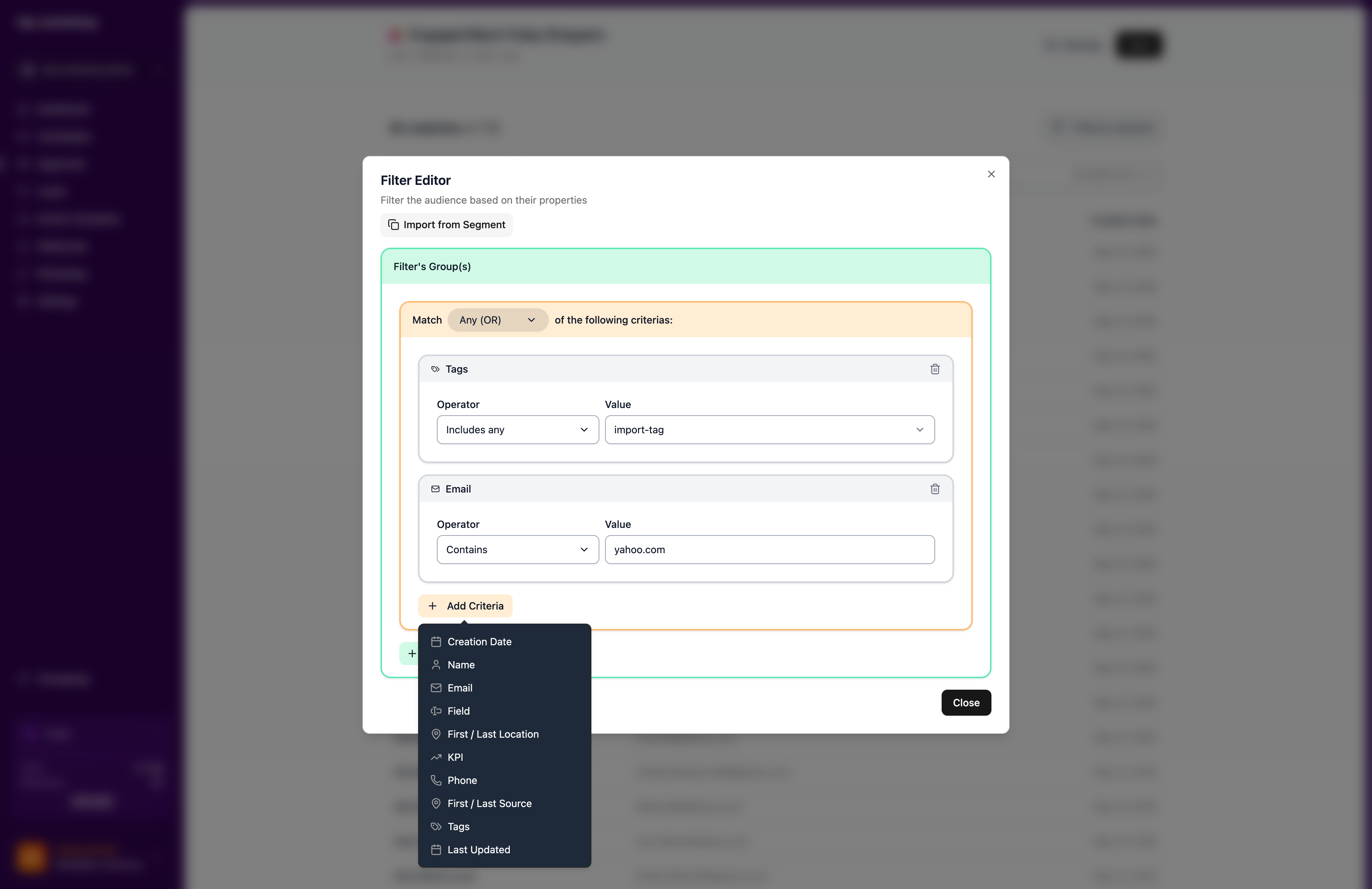
Define who gets each campaign with 11 criteria types and nested AND/OR logic. See the match count update as you build.
1,000 free sends every month · no credit card
Need a walkthrough? Talk to sales
Segment builder
Stack rules and watch the match count update
Key capabilities
11 criteria types
Filter by name, email, phone, tags, dates, custom fields, location, source, behavior, and KPIs.
Nested AND/OR
Stack conditions three levels deep. Combine groups with AND or OR, not just flat lists.
Live match count
Watch the audience size change while you edit. Know your reach before you send.
Geo radius
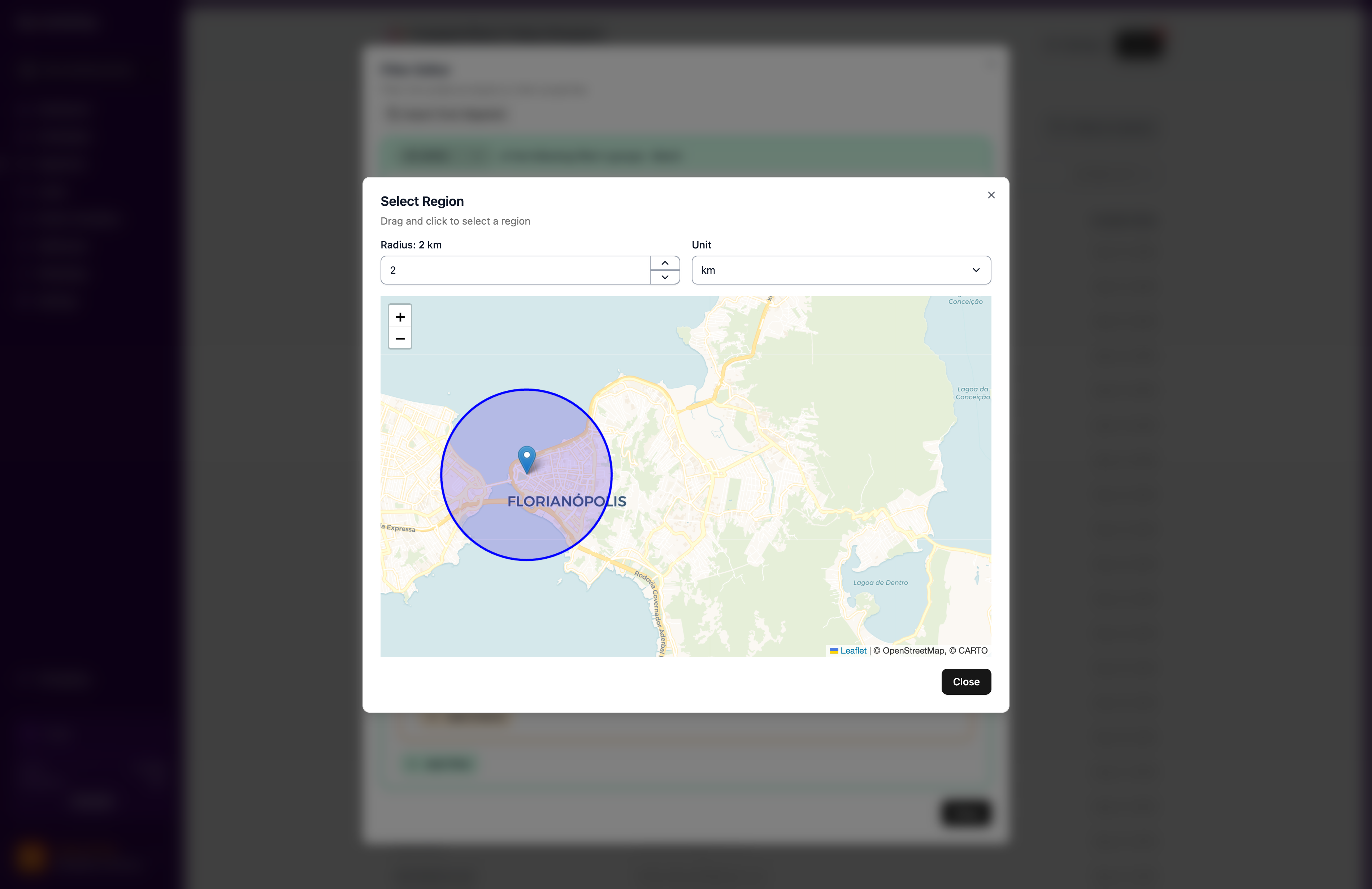
Draw a radius on the map. Include or exclude leads by distance from a point.
Relative dates and birthday mode
"Created in the last 30 days" rolls forward on its own, and birthday mode matches day and month while ignoring the year.
Behavior criteria
Filter by real behavior: opened an email, clicked a campaign, visited a page, replied on WhatsApp.

Marina Alves
VIP buyer · São Paulo, BR
Recent activity
Opened “Summer Sale”
2 days ago
Clicked WhatsApp promo
1 week ago
Consent
Managed by contactEmail + WhatsApp
Opted in · Apr 2025
Custom fields
One rich profile
The person behind every send
A contact is never just a row in a spreadsheet. Every open, click, and reply, the channels they opted into, and the fields you care about live on one profile, so the next message already knows who it's reaching.
- Activity, consent, and custom fields on a single record.
- Per-channel opt-in your contact controls: consent travels with them.
- One profile across email and WhatsApp, deduplicated on import.

Marina Alves
Lead
VIP buyers
512 leads
Cart recovery
88 leads
Summer Sale
Campaign · sent
Everything is linked
Leads, segments, and campaigns, connected
Nothing lives in isolation. A lead is tied to every segment it belongs to and every campaign that reached it, so you can see who matched a rule, who got a send, and why, without stitching exports together.
- Trace any lead to the segments it belongs to.
- See why it matched: fixed membership or a live rule.
- Follow it through to the campaign that actually sent.

From 40,000 contacts to the 900 who matter
Your whole base on one map, and a circle around the 900 people who matter today. Birthday this week, last seen within 20 km of the store, lifetime value above 500: three criteria, nested once, recalculated on every send. Attach the segment to a daily recurring campaign and each morning only that day’s matches get the offer. The other 40,000 contacts never hear a thing, and never show up on your bill.
Related
Birthday play
Day-and-month matching plus a daily campaign. Set and forget.
Explorecampaign, set once
1
sends: matches only
daily
Local campaigns play
A radius on the map: message only who can show up.
Explorefree sends every month
1,000
per contact stored
$0
Win-back play
Relative dates find who cooled off; KPIs pick who matters.
Explorefree sends every month
1,000
per contact stored
$0
Campaigns
One-time, recurring, and API-triggered sends.
Exploreways to send
3
webhooks per send
3
Import
Upload CSV or XLSX, storage is free.
Explorestorage cost, any size
$0
formats: CSV, XLSX
2





Common questions
Can’t find the answer you’re looking for? Talk to our team and a human replies.
Do segments update automatically?
Segments are dynamic. They recalculate every time they are used, at each recurring cycle, at send time for one-time campaigns, so who qualifies today is who receives today.
Can I mix criteria types in one segment?
Yes, combine as many criteria as the audience needs: (tag VIP AND within 10 km) OR (lifetime value above 500 AND clicked the last campaign). Three levels of nesting.
What does segmentation cost?
Nothing. Building, saving, and counting segments is free. You pay only when a campaign sends to one.
Last updated 2026-07-21
Build your first segment
1,000 free sends every month · no credit card