Import
Import your list.
Send when you are ready.
Upload a spreadsheet, map columns, fix errors, import. Contacts with the same email or phone merge into one profile. You pay when you send, not when you store.
1,000 free sends every month · no credit card
Need a walkthrough? Talk to sales
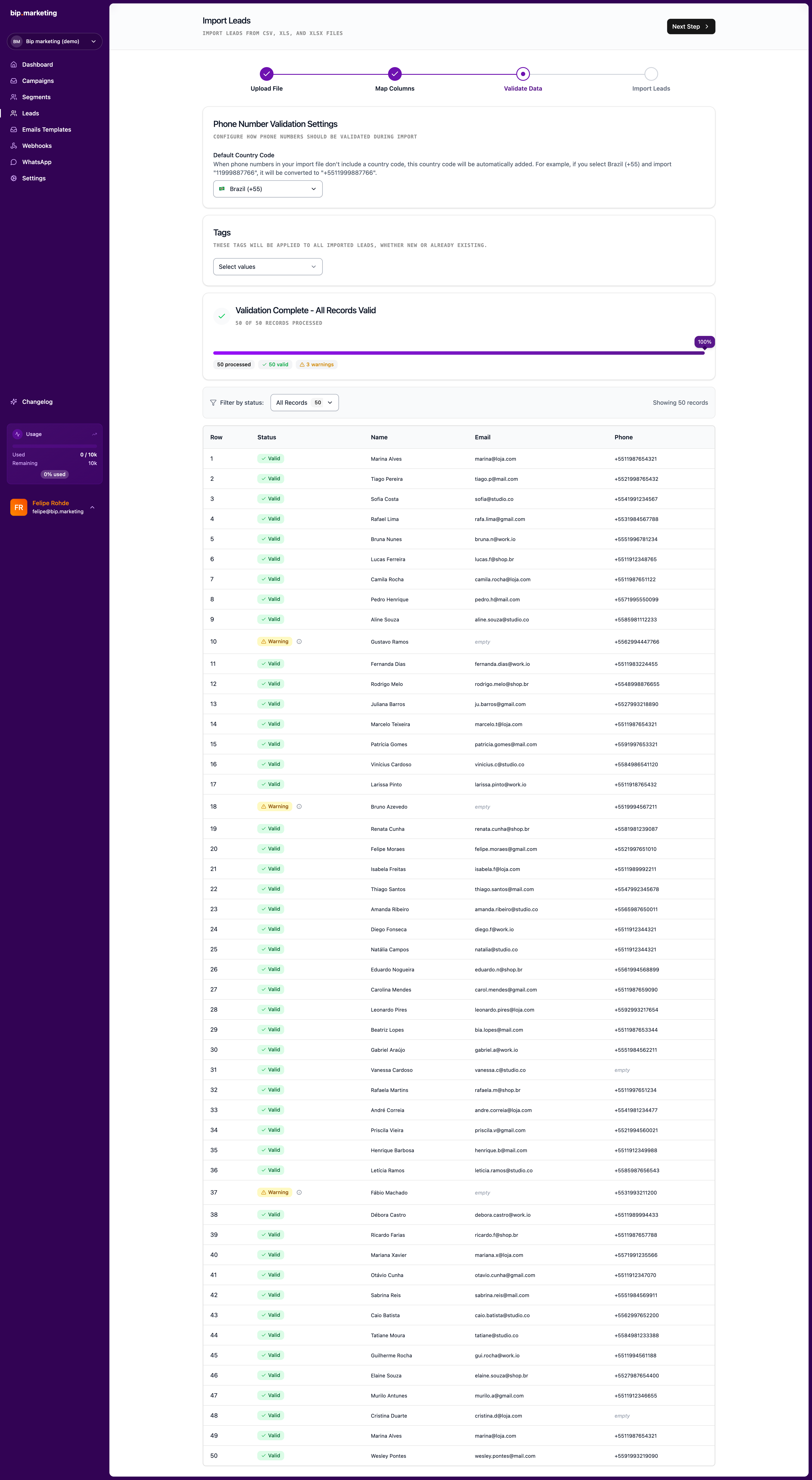
Import wizard
Map columns and validate before the first send
Key capabilities
Column mapping
Match spreadsheet columns to name, email, phone, tags, notes, and custom fields.
Validation first
See invalid emails, bad phones, and missing fields per row before anything hits your base.
Partial import
Good rows import even when others fail. One bad line does not block the batch.
Batch tags
Tag the whole batch in one step: source, event, migration date.
Deduplication on entry
Rows matching an existing email or phone merge into the same profile: extra data is added, never duplicated.
Phone normalization
Set a default country code and numbers without one normalize automatically: no +55 in every cell.


50,000 messy rows in, one clean campaign out
The trade show ends with 50,000 rows of chaos: three name formats, phones without country codes, a hundred duplicates. The wizard maps the columns, flags the broken rows, normalizes every phone to +55, and merges duplicates into single profiles. The good 49,600 import even while you fix the stragglers. Tag the whole batch "expo-2026", build a segment of the 2,000 hottest leads, send one campaign. The bill: 2,000 sends. The other 48,000 contacts sleep in your base for free until their moment comes.
Related
Welcome play
Create the lead and fire the hello in one API call.
Explorefree sends every month
1,000
per contact stored
$0
Win-back play
Relative dates find who cooled off; KPIs pick who matters.
Explorefree sends every month
1,000
per contact stored
$0
Segmentation
Nested filters, behavior, and geo radius.
Explorecriteria types
11
levels of nesting
3
Campaigns
One-time, recurring, and API-triggered sends.
Exploreways to send
3
webhooks per send
3



Common questions
Can’t find the answer you’re looking for? Talk to our team and a human replies.
Will re-importing create duplicates?
No. Imports upsert by email or phone. Existing contacts are enriched with the new data, and you can choose not to overwrite fields with blank cells.
What file formats can I import?
CSV and XLSX. Export from any tool, map the columns in the wizard, and validation flags problems per row before anything is saved.
What happens when some rows have errors?
Valid rows import even if others fail: you fix the flagged lines and re-run just those. A thousand good records never wait on ten bad ones.
Last updated 2026-07-21
Import and send
1,000 free sends every month · no credit card